- Grok Bot runs named AI bots on a shared cloud computer that connect to your tools and keep working when your laptop is closed.
- A team of specialists, each with one job, plus a coordinator bot, is easier to manage than one general assistant.
- Skills save how a task is done; routines run it on a schedule or when something happens.
- Bots should draft and check; sending, publishing, spending and deleting should wait for your approval.
- Start with one read-only task, make it reliable, then add bots one lane at a time.
From one AI assistant to a team of AI bots
Most online retailers have tried a chat assistant: paste in a product sheet, get a description back. Useful, but you are still the one copying, pasting, checking and chasing. The next step is different. Instead of one assistant waiting for prompts, you run a small team of AI bots, each with its own job, that work on their own computer, follow a schedule and only come back to you when something needs a decision.
Grok Bot is one product built for exactly this. Its makers describe it as a team of always-on agents that “have their own computer”, sign into the tools you already use and “only come back when something needs your approval”. This guide explains how that works for an ecommerce business, what is worth automating, how to keep a person in control, and how to set it up step by step. The examples come from a working ten-bot setup that PalMultimedia runs, described generically.
Want Grok Bots working for your store? PalMultimedia plans, sets up and tunes multi-bot teams for ecommerce businesses.
See how we help ↓What Grok Bot is, in plain English
According to the official documentation, each Bot is a named AI teammate you message like a colleague. The key ideas are:
- A shared cloud computer. All of your Bots work on one persistent cloud computer with a browser, files and a terminal. They share its files, browser sessions and logins so they can pass work along, and that work carries on when your laptop is closed (FAQ).
- Connectors and websites. Bots connect to everyday tools such as Gmail, Google Drive, Slack, Notion and GitHub, and support custom tooling through MCP or an API. Where no connector exists, they can use the website in their browser (overview).
- Skills and routines. A skill is a saved method for a task. A routine tells a Bot when to run it: on a schedule, or when something happens, such as an email to the Bot’s own address or a webhook call (skills and routines).
- Bots that talk to each other. Bots can message one another, hand off work and share a group chat, so one specialist can ask another for help (Grok Bot 101).
- Approvals. An Auto Review layer checks actions before they run, and your own “Ask first” rules stop actions such as sending email or publishing until you approve them (approvals).
The apps run on macOS, Windows and Linux, with companion apps for iPhone and Android. Plans, pricing and features change quickly, so check the changelog before you commit.
Why a team of specialists works better than one bot
One general assistant soon becomes a muddle of half-remembered instructions. Specialists stay sharp because each one keeps its own role, memory and saved methods. In our setup, each bot owns one lane of the business and a coordinator bot keeps the overview.
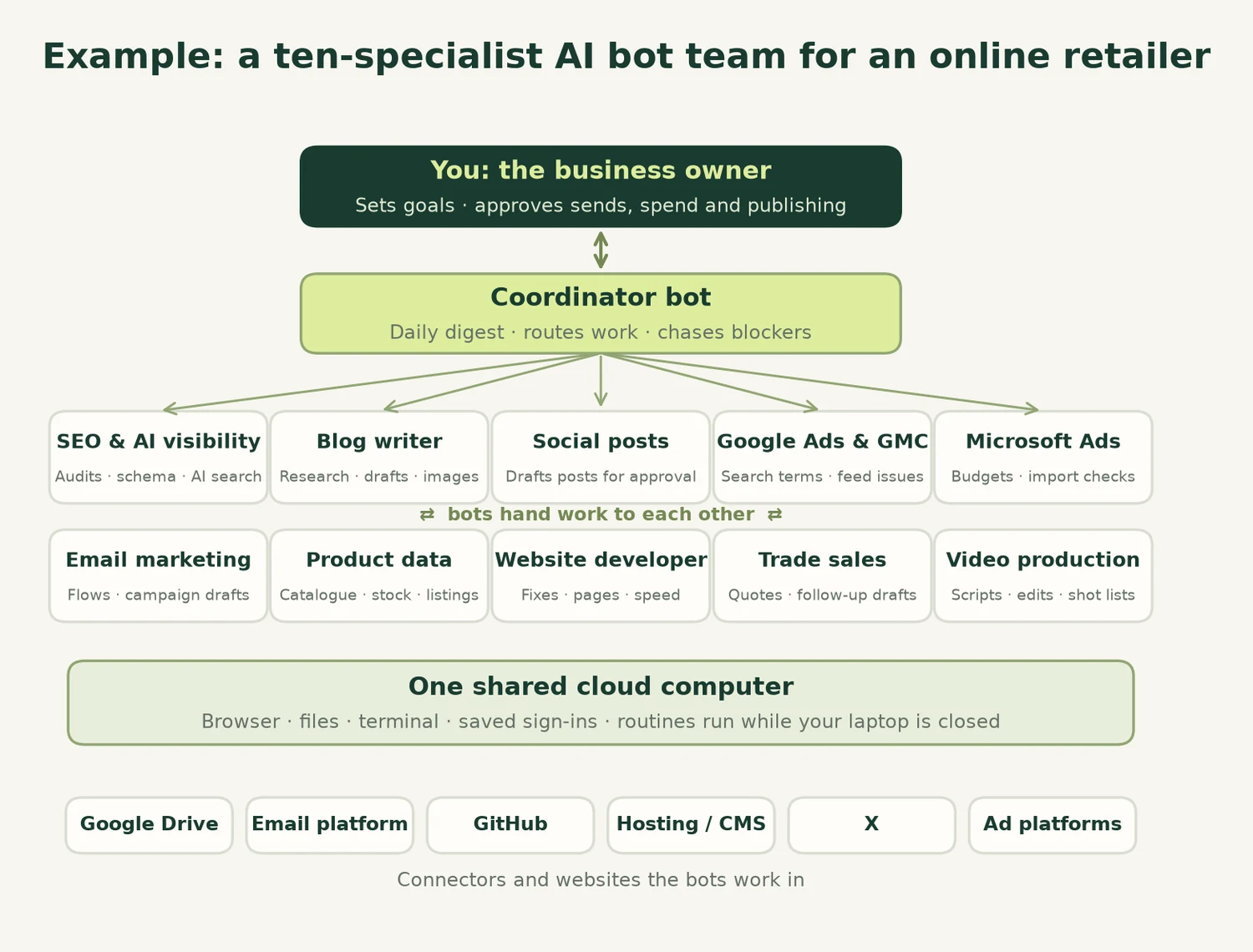
The pattern mirrors how the product’s own team says it works: one Bot managing several specialists, each covering a lane such as inbox, operations or recruiting (launch announcement). For a retailer, the lanes look like this:
| Bot | Typical jobs | Works in (our setup) |
|---|---|---|
| SEO & AI visibility | Technical audits, structured data checks, how the brand appears in AI search answers | Browser, Search Console exports, site files |
| Blog writer | Researched articles with sources, charts and credited stock images | Browser, WordPress, Google Drive |
| Social posts | Drafts posts and replies for approval | X connector, Google Drive |
| Google Ads & Merchant Center | Search-term reviews, product feed errors, weekly reports | Ad and Merchant Center accounts |
| Microsoft Ads | Import checks, budget pacing, Bing-specific search terms | Microsoft Advertising |
| Email marketing | Flow audits and campaign drafts in an email platform such as Klaviyo | Klaviyo connector |
| Product data | Catalogue clean-up, stock and listing checks across Magento and Linnworks | Browser, spreadsheets |
| Website developer | Fixes, landing pages, speed and security checks | GitHub, hosting connector |
| Trade sales | Quote follow-ups and account summaries, drafted for a person to send | Email drafts, Google Drive |
| Video production | Scripts, shot lists and short product clips | Files on the shared computer |
 Google Ads
 Advertising

 Open Source


Logos are trademarks of their respective owners and are shown for identification only. No partnership or endorsement is implied.
How an automated workflow runs, from trigger to result
Every useful automation follows the same shape. Something starts it, a bot does the legwork, and a person approves anything that leaves the building.
The safe pattern: bots do the legwork, people make the calls that cannot be undone.
Worked example: a weekly ads clean-up for a fashion retailer
Every Monday at 7am, a routine wakes the Google Ads bot. It downloads last week’s search terms, flags queries that spent money without a sale (say “free dress patterns” for a shop that sells finished dresses) and drafts a list of negative keywords. It hands the product-feed warnings it finds to the product data bot, which checks the catalogue and drafts fixes. By 8am the coordinator bot’s daily digest shows both drafts. You approve the negatives in two minutes; nothing changes in the account until you do.

What to automate first
| Task | Trigger | Bot | Human sign-off |
|---|---|---|---|
| Morning trading digest (sales, stock, ad spend) | Weekdays at 8am | Coordinator | None: read-only |
| Merchant Center feed error check | Daily | Google Ads & GMC | Before feed or product changes |
| Search-term review and negative keywords | Weekly | Google Ads, Microsoft Ads | Before any account change |
| Blog post research and draft | On request | Blog writer | Before publishing |
| Abandoned-basket and post-purchase email drafts | Monthly review | Email marketing | Before sending or going live |
| Price and stock mismatch check across channels | Daily | Product data | Before updating listings |
| Uptime, SSL and speed monitor | Hourly or daily | Website developer | Before code changes |
| “Tell me when” alerts (a competitor price, a back-in-stock item) | On change | Any | None: alert only |
We have deliberately left out “time saved” figures. Savings depend on your volumes and how much checking each draft needs, so measure your own: log how long a task took by hand for a month, then compare.
Safety: keep a person in charge
An AI bot that can sign into your ad account or your store can also make expensive mistakes. The controls below come from the official approvals, security and privacy guidance, plus our own house rules.
Let bots do on their own
- Read data and build reports
- Draft emails, posts, pages and campaign changes
- Monitor sites, feeds and prices
- Hand work to another bot
Keep human sign-off
- Sending any email or message
- Publishing content or changing a live site
- Changing budgets, bids or campaigns
- Purchases, refunds and deleting data
- Write “Ask first” rules. Add short, narrow rules such as “ask first before sending any external email”. If an Ask first rule and an allow rule both match, Ask first wins.
- Put the boundary in the request. For example: “Draft a recommended budget change. Do not change the campaign. Ask for approval after showing the current value and the proposed value.”
- Remember bots share one computer. The documentation is clear that separate Bots are not a security boundary, so only connect accounts you are happy for every bot to reach (FAQ).
- Watch for instructions hidden in web pages and emails. Auto Review only treats your own messages as instructions, but the docs say this lowers the risk rather than removing it.
- Keep passwords out of chat. Bots can sign in from a vault or secure form without seeing the values; use that rather than pasting credentials.
You stay responsible. The CMA’s guidance on AI agents says businesses remain responsible for what their AI tools do and tell consumers. If bots handle customer data, follow the ICO’s AI guidance under UK GDPR.
Step-by-step: setting up your first bot team
- List your repetitive jobsWrite down the tasks you or your team repeat every week, who does them and which tools they touch. Circle the ones that are easy to check.
- Start with one bot and one taskCreate a single bot with a clear role, for example “Google Ads analyst for a UK fashion store”, and give it one read-only job such as a weekly search-term report.
- Connect tools with the least access neededAdd connectors such as Google Drive or your email platform. Where a tool has no connector, sign in yourself on the bot’s computer and let it work in the browser.
- Set Ask first rules before anything goes liveAdd rules for sending, publishing, spending and deleting, so every consequential step stops on an approval card.
- Make it reliable, then save it as a skillRun the task by hand a few times, correct the bot, and ask it to save the method. The official guidance is to make a one-off task reliable before automating it.
- Turn it into a routineAsk the bot to run the skill on a schedule or a trigger, and say what should happen if a data source is missing.
- Add specialists and a coordinatorOnce one lane works, add the next bot. A coordinator bot can send a morning digest and route work between them.
- Review monthlyCheck what each bot did, the drafts you rejected and why, and tighten rules or retire routines that are not earning their keep.
The honest limits
- Websites push back. Some sites block automation, ask for a fresh login or show a CAPTCHA. The bot should hand that step to you, not work around it.
- Approvals can expire. Approvals requested by a routine or by another bot expire after about 30 minutes if nobody answers, so time routines for when someone is around.
- Usage adds up. Routines have hourly run limits, and broad triggers (“any message in a busy channel”) burn usage on work that does not matter.
- Memory is not a database. For prices, stock and money, ask the bot to check the live source rather than rely on what it remembers.
- It does not replace judgement. Bots are good at gathering, drafting and checking. Pricing strategy, supplier relationships and customer complaints still need you.
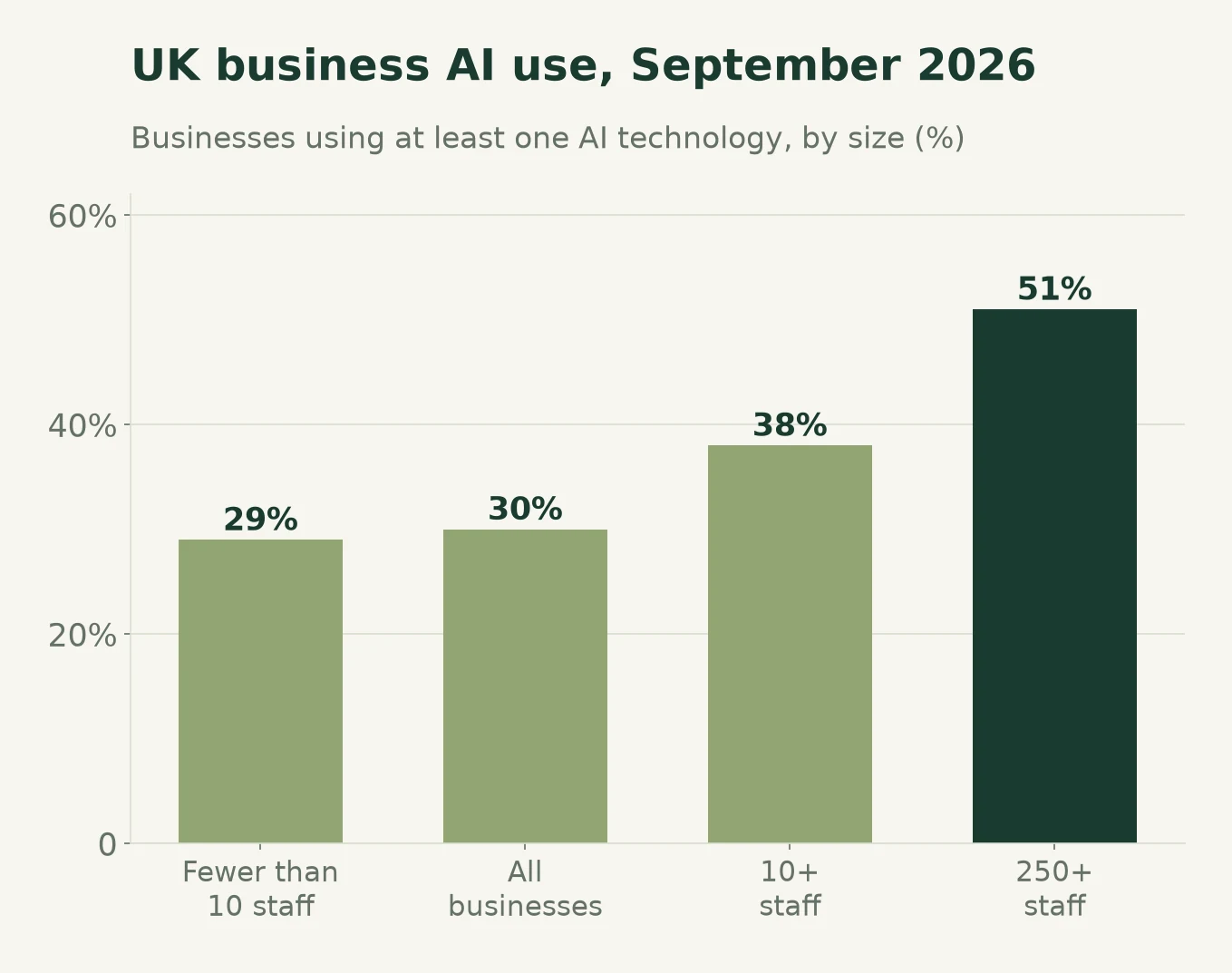
The wider picture: AI use is rising fastest in larger firms, but 29% of UK businesses with fewer than 10 staff already use at least one AI technology (ONS). A small retailer with a well-run bot team can cover ground that once needed several part-time roles, as long as a person stays in charge.
How PalMultimedia helps you get the most from Grok Bots
Setting up one bot is easy. Getting a team of bots to do useful, reliable work for an online shop takes planning, good instructions and sensible guardrails. That is where we come in.
Ecommerce first, AI second. Raspal Thakur has more than 16 years in ecommerce: Magento and Shopify builds, Google and Microsoft Ads, Merchant Center feeds, analytics and Linnworks integrations. Your bots are set up by someone who knows how an online shop actually runs.
Frequently asked questions
What is Grok Bot?
Grok Bot is an AI app in which you run named AI bots that work on their own shared cloud computer, connect to your tools, follow schedules and triggers, hand work to each other and ask for your approval before consequential actions.
Can AI bots run my online shop on their own?
No, and they should not. They are best at gathering data, drafting and monitoring. Sending, publishing, spending and deleting should stop for a person to approve.
Do I need a connector for every tool?
No. Connectors are more reliable where they exist, but bots can also work in websites through their browser. Some sites block automation or need you to sign in yourself.
How many bots should I start with?
One. Get one bot doing one read-only task reliably, save it as a skill and a routine, then add specialists one lane at a time.
Is it safe to give a bot access to my ad accounts?
Only with clear boundaries. Use Ask first rules for any change to budgets, bids or campaigns, connect the least access needed, and remember that bots on one account share the same computer and logins.
Can you set up Grok Bots for my business?
Yes. PalMultimedia plans which bots you need, writes their instructions and skills, connects your tools (such as Google Ads, Merchant Center, Microsoft Ads, Klaviyo, Magento, Shopify, Linnworks, Google Drive and analytics), sets up routines and reports, adds approval and safety rules, trains your team and keeps tuning the setup. Raspal Thakur has more than 16 years in ecommerce. Email hello@palmultimedia.com to book a free call.
Sources
Figures and product details were checked against these sources in November 2026. Platforms change quickly, so check the latest documentation before making technical or budget decisions.
- x.ai, Introducing Grok Bot
- Grok Bot docs, Overview
- Grok Bot docs, Frequently asked questions
- Grok Bot docs, Skills and routines
- Grok Bot docs, Approvals, security and privacy
- Grok Bot docs, Grok Bot security
- Grok Bot Guides, Grok Bot 101
- Grok Bot changelog
- ONS, Business insights and impact on the UK economy, 8 October 2026
- GOV.UK (CMA), Complying with consumer law when using AI agents
- ICO, Artificial intelligence guidance
Want a bot team that fits your store? PalMultimedia sets up AI automation, multi-bot workflows and AI chat assistants for ecommerce businesses, with human approval built in. Email hello@palmultimedia.com or send a message.