- Shopify made its REST Admin API legacy in October 2024; Linnworks Shopify integrations are moving to GraphQL.
- Linnworks reports about five times faster order downloads after the upgrade, with no reconnection needed.
- Order references and XML field names change, so check macros, rules and templates.
- Shopify POS users must update settings after upgrading or POS orders need manual handling.
- Map every Shopify location to a Linnworks location, and give every variant a unique SKU.
Shopify and Linnworks: get locations and variants right
Shopify is one of the most widely used platforms for UK online shops, and many of them add Linnworks once they start selling on Amazon, eBay or other marketplaces. The integration is mature, but two things cause most problems: how Shopify locations map to Linnworks warehouses, and how variants map to SKUs. In 2026 there is a third: the move to Shopify’s GraphQL API.


Logos are trademarks of their respective owners and are shown for identification only. No partnership or endorsement is implied.
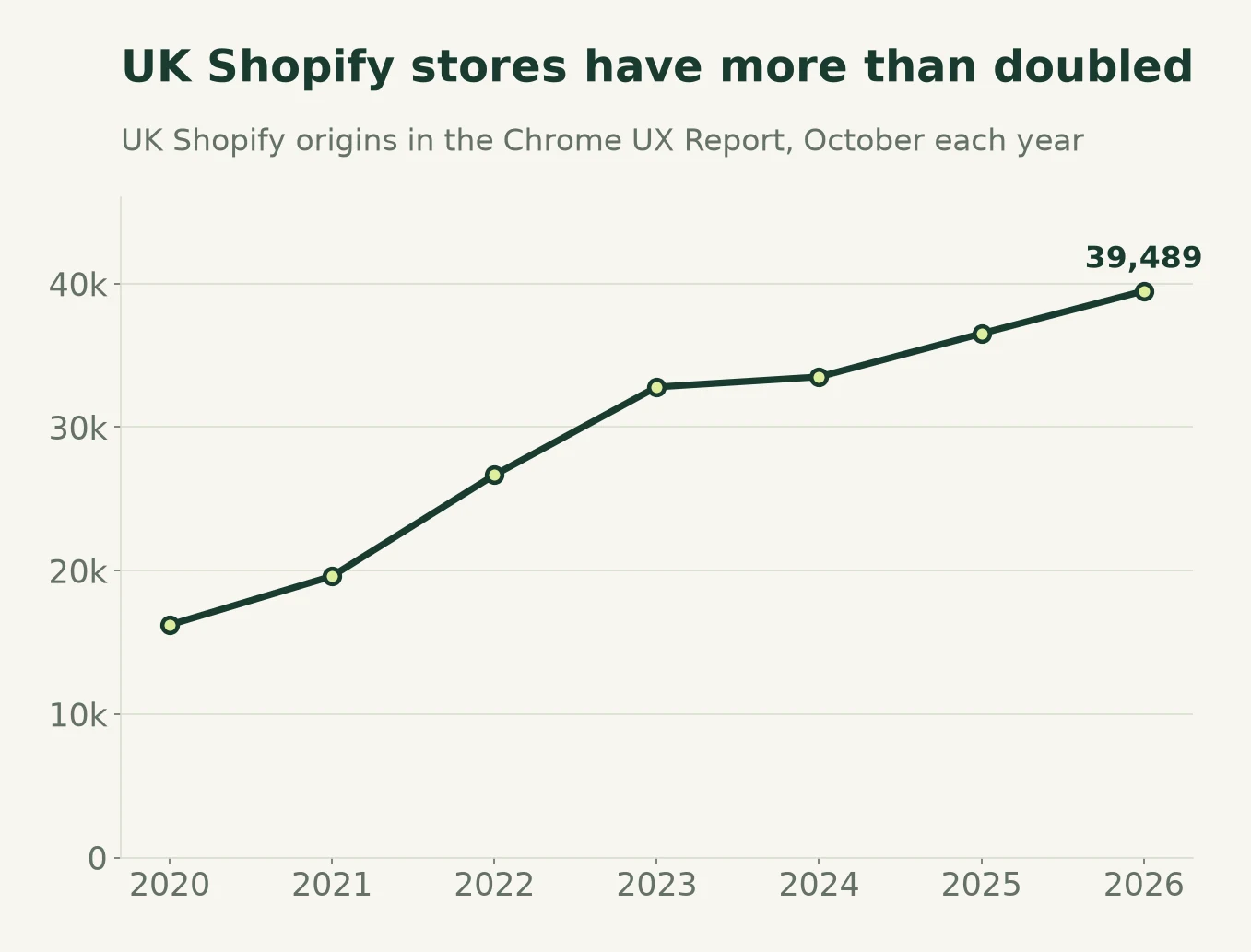
The GraphQL change, in plain English
- Shopify makes the REST Admin API a legacy API.
- All new public Shopify apps must use the GraphQL Admin API.
- Linnworks publishes its GraphQL upgrade guide. New Shopify integrations use GraphQL; existing ones are upgraded per integration.
Sources: Shopify.dev, REST Admin API and Linnworks Support.
According to Linnworks, the upgrade does not require you to reconnect your store, does not change inventory sync, and adds support for split fulfilments, presentment currency, Avalara tax and duties as service items. Four things deserve attention before you upgrade:
- Order reference format. References change from the Shopify order ID to
OrderID-FulfillmentOrderID. Update any macros, rules or searches that match on the old format. - Raw order XML. Field names change from PascalCase to camelCase, which can break custom templates or scripts.
- Shopify POS. “Process POS orders” is replaced by “Deduct stock for fulfilled POS orders”. POS orders must be marked fulfilled in Shopify, and “Download processed orders” must be on, or they will need manual handling.
- Split orders. A new setting decides whether each Shopify fulfilment becomes its own Linnworks order.
Choosing the “split orders by Shopify fulfilments” setting
| Scenario | Setting off | Setting on |
|---|---|---|
| One fulfilment order | One Linnworks order | One Linnworks order |
| Two fulfilments, both locations mapped to the same Linnworks warehouse | One combined order | Two orders, blocked from merging |
| Two fulfilments, mapped to different warehouses | Two orders, one per warehouse | Two orders, one per fulfilment |
Off is the default for upgraded integrations and keeps behaviour as it was. On is the default for new integrations and suits stores that rely on Shopify’s own fulfilment routing. Linnworks’ advice: if your current workflow works, leave it off. Source: Linnworks Support.
Locations: decide what stock each channel sees
Linnworks locations represent your warehouses, and a SKU can have a different stock level in each. Shopify has its own locations. The two must be mapped deliberately.
If no Linnworks location is selected for a Shopify location, no stock level is sent for it.
- Map every active Shopify location, including retail shops if you use Shopify POS.
- Decide whether 3PL or Amazon FBA stock should be offered on Shopify at all.
- Check order download locations, so orders land in the warehouse that will ship them.
Variants and SKUs
- Every variant (size, colour) needs its own unique SKU in Shopify. Linnworks does not show variation parent SKUs in mapping, because they are not physical items.
- Avoid reusing a SKU across two variants or products; mapping will link the wrong stock.
- Digital and virtual products do not appear in Linnworks mapping, by design.
- If you change a SKU in Shopify, download listings again in Linnworks and re-check the link.
Source: Linnworks, SKUs missing from Channel Mapping.
Shopify and Linnworks checklist
- Audit SKUsExport Shopify products and check every variant has a unique SKU that matches Linnworks.
- Map locationsMatch each Shopify location to the right Linnworks location and order download location.
- Review custom rulesList macros, rules, invoices and scripts that use order references or XML.
- Upgrade to GraphQLUpgrade on a quiet day. Leave split orders off unless you need it.
- Fix POS settingsIf you use Shopify POS, set the new stock deduction and processed-orders options.
- Test ordersPlace single, split-fulfilment and POS test orders and check stock and dispatch.
Before peak season. Do the GraphQL upgrade and test well before Black Friday. Only orders downloaded after the upgrade use the new format, so a calm period makes any reference-matching issues easy to spot.
Frequently asked questions
Do I need to reconnect Shopify after the Linnworks GraphQL upgrade?
No. Linnworks says no re-authentication is required and your existing connection stays active.
Does the GraphQL upgrade change stock sync?
No. Linnworks says inventory sync and stock levels are unchanged; the upgrade affects the order side.
Why are my Shopify POS orders not processing in Linnworks?
After the upgrade, POS orders must be marked fulfilled in Shopify and “Download processed orders” must be enabled. Otherwise they download but need manual processing.
Why is a Shopify variant missing from Linnworks mapping?
It probably has no SKU, a duplicate SKU, is a digital product, or was created recently. Download listings again after fixing it.
Should I turn on split orders by Shopify fulfilments?
Only if you rely on Shopify’s fulfilment routing and want each fulfilment tracked separately. Otherwise leave it off.
Sources
Figures and product details were checked against these sources in November 2026. Platforms change quickly, so check the latest documentation before making technical or budget decisions.
- Linnworks Support, Shopify integration upgrade to GraphQL
- Linnworks Support, Shopify GraphQL API upgrade: what you need to know
- Shopify.dev, REST Admin API reference
- Linnworks Support, Locations and multiple warehouses
- Linnworks Support, Inventory mapping
- Linnworks Support, SKUs missing from Channel Mapping
- Linnworks, Shopify integration
- HTTP Archive API, Shopify UK
Want a second opinion on your own store? Email hello@palmultimedia.com or send a message with your website address and the problem you are trying to solve.
