
- Magento 2.4.9 was released on 12 May 2026 and has regular support until 31 May 2029.
- 2.4.6 regular support ended on 11 August 2026; 2.4.7 ends on 31 May 2027. Older lines are unsupported.
- 2.4.9 moves to PHP 8.5, OpenSearch 3, Valkey 9 and MariaDB 12.3 or MySQL 8.4. Extensions are the usual blocker.
- SessionReaper showed that slow patching is the real risk: 49% of stores were attacked within days.
- Audit first, upgrade on staging, test checkout and integrations, then launch in a quiet trading window.
Why Magento 2.4.9 matters for UK stores
Magento Open Source and Adobe Commerce 2.4.9 went on general release on 12 May 2026. It is now the newest release line, and Adobe will give it regular support until 31 May 2029. If your store is still on 2.4.6 or earlier, the bigger story is not the new features. It is that your release line has already stopped receiving regular security fixes.
That matters more than it used to. In autumn 2025 the SessionReaper vulnerability (CVE-2025-54236) showed how quickly attackers move against unpatched Magento stores. Within days of the exploit going public, automated attacks were hitting a large share of all stores. An upgrade plan is now part of running a store safely, not a nice-to-have.
This guide explains what changed in 2.4.9, which versions are still supported, what the security lessons of 2025 mean for your budget, and a practical step-by-step plan for upgrading without disrupting trade.
 Open Source
 Commerce
 Hyvä
Logos are trademarks of their respective owners and are shown for identification only. No partnership or endorsement is implied.
Which Magento versions are still supported?
Adobe supports each Magento 2.4 release line for a fixed period and publishes security patches for it on a regular schedule. Once a line reaches its end date, Magento Open Source stores receive nothing further. Adobe Commerce (the paid edition) customers get extended support on some lines.
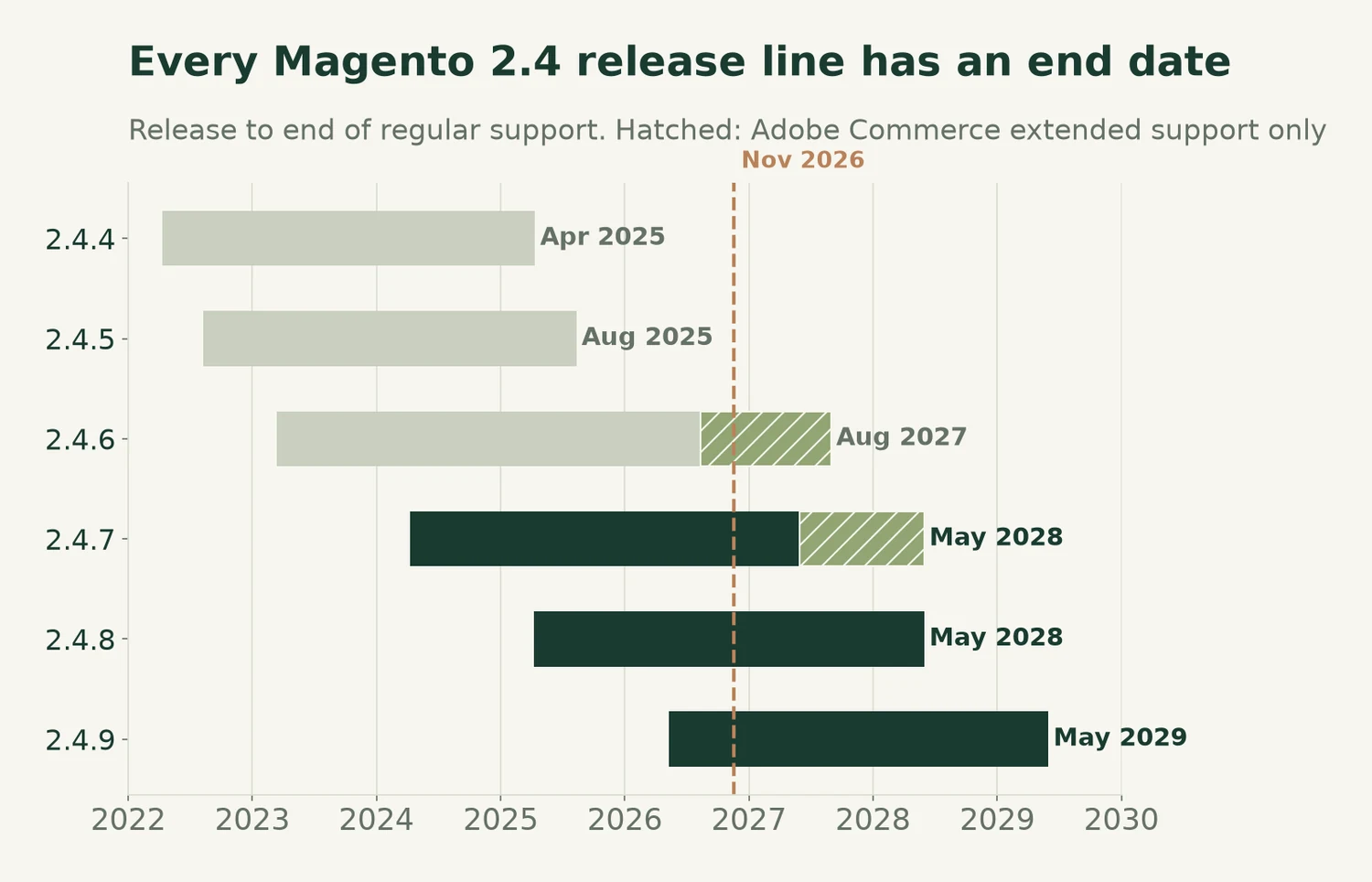
| Release line | Released | End of regular support | Latest patch (Nov 2026) | Status |
|---|---|---|---|---|
| 2.4.9 | 12 May 2026 | 31 May 2029 | 2.4.9 | Supported |
| 2.4.8 | 8 Apr 2025 | 31 May 2028 | 2.4.8-p5 | Supported |
| 2.4.7 | 9 Apr 2024 | 31 May 2027 | 2.4.7-p10 | Supported, plan now |
| 2.4.6 | 14 Mar 2023 | 11 Aug 2026 | 2.4.6-p15 | Ended (Adobe Commerce extended to Aug 2027) |
| 2.4.5 and older | 2022 or earlier | Ended | – | Unsupported |
If you run 2.4.7, you have until the end of May 2027. That sounds like plenty of time, but a careful upgrade with extension updates, testing and a quiet trading window usually takes several weeks. Planning a move straight to 2.4.9 in early 2027 avoids doing two upgrades in two years.
What is new in Magento 2.4.9
Most of 2.4.9 is platform housekeeping, which is exactly what keeps a store secure and fast. Adobe’s system requirements for 2.4.9 move the whole stack forward:
| Component | 2.4.9 | 2.4.8-p5 | 2.4.7-p10 |
|---|---|---|---|
| PHP | 8.5 | 8.4, 8.3 | 8.3, 8.2 |
| Database | MariaDB 12.3 (recommended) or 11.8; MySQL 8.4 | MariaDB 11.4, 11.8; MySQL 8.4 | MariaDB 10.11, 11.8 |
| Search | OpenSearch 3 | OpenSearch 3 | OpenSearch 2 or 3 |
| Cache | Valkey 9 | Valkey 8.1 | Valkey 8.1 |
| Message queue | RabbitMQ 4.3 | RabbitMQ 4.3 | RabbitMQ 4.3 |
| Web server | nginx 1.30 | nginx 1.30 | nginx 1.30 |
| Composer | 2.10 | 2.10 | 2.10 |
Three changes deserve attention when you plan the work:
- PHP 8.5. PHP 8.5 is the supported runtime for 2.4.9. Every custom module and third-party extension has to run cleanly on it. Older extensions that have not been maintained are the most common blocker.
- Valkey instead of Redis. Valkey is the open-source, Redis-compatible cache that Adobe now lists. In most set-ups the change is a hosting configuration job, but your host needs to support it.
- Library and editor updates. The 2.4.9 release notes list updated Symfony 7.4 components, newer jQuery UI and jQuery Validate libraries, and the HugeRTE editor in place of TinyMCE. Admin customisations that hook into the old editor need checking.
Merchants using Braintree also get new payment options, including Google Pay vaulting, promo codes inside the Apple Pay and Google Pay express sheets, and Apple Pay on Chrome and Firefox. There are also hundreds of quality fixes, from PDF invoice layouts to faster sales-grid processing on large order tables.
The security lesson of 2025: patch speed matters
In September 2025 Adobe released an emergency fix for SessionReaper, a critical flaw that let attackers take over customer sessions and, on many servers, run code remotely. The fix was published in bulletin APSB25-88. Security firm Sansec tracked what happened next.
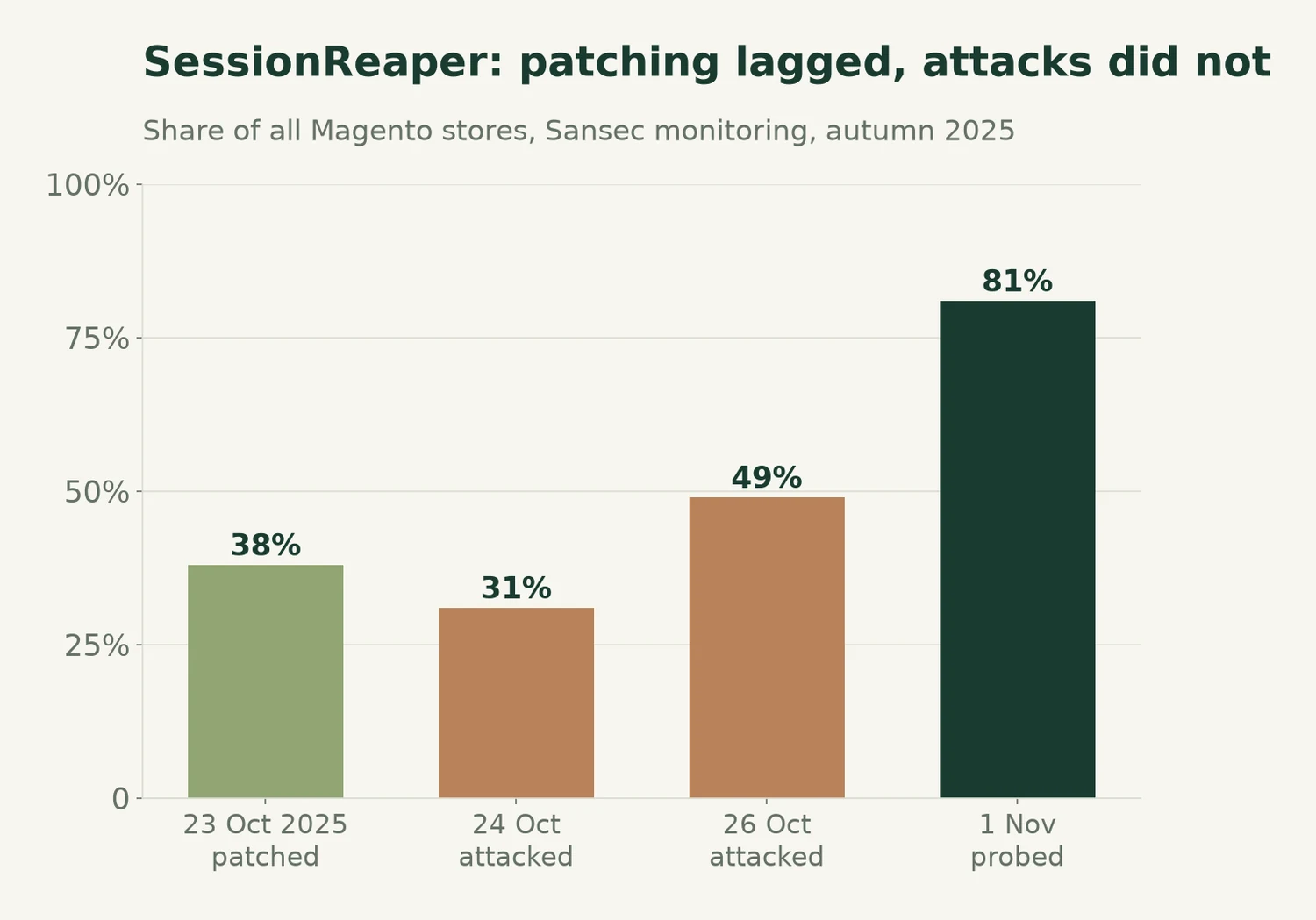
According to Sansec’s timeline, only 38% of stores had applied the fix by 23 October 2025, the day after a working exploit became public. Mass attacks reached 31% of all Magento stores the next day and 49% by 26 October, when Sansec estimated that 16–18% of stores had one or more backdoors installed. By 1 November, 81% of stores had been probed.
What this means for you: the risk is rarely the upgrade itself. It is the gap between a patch being released and your store running it. Stores on supported versions, with a routine for applying security patches within days, were in a far better position.
Security patches for supported lines arrive on a published schedule, usually every couple of months. Book time for them in advance, just as you would for a seasonal sale.
Upgrades and performance: what the data shows
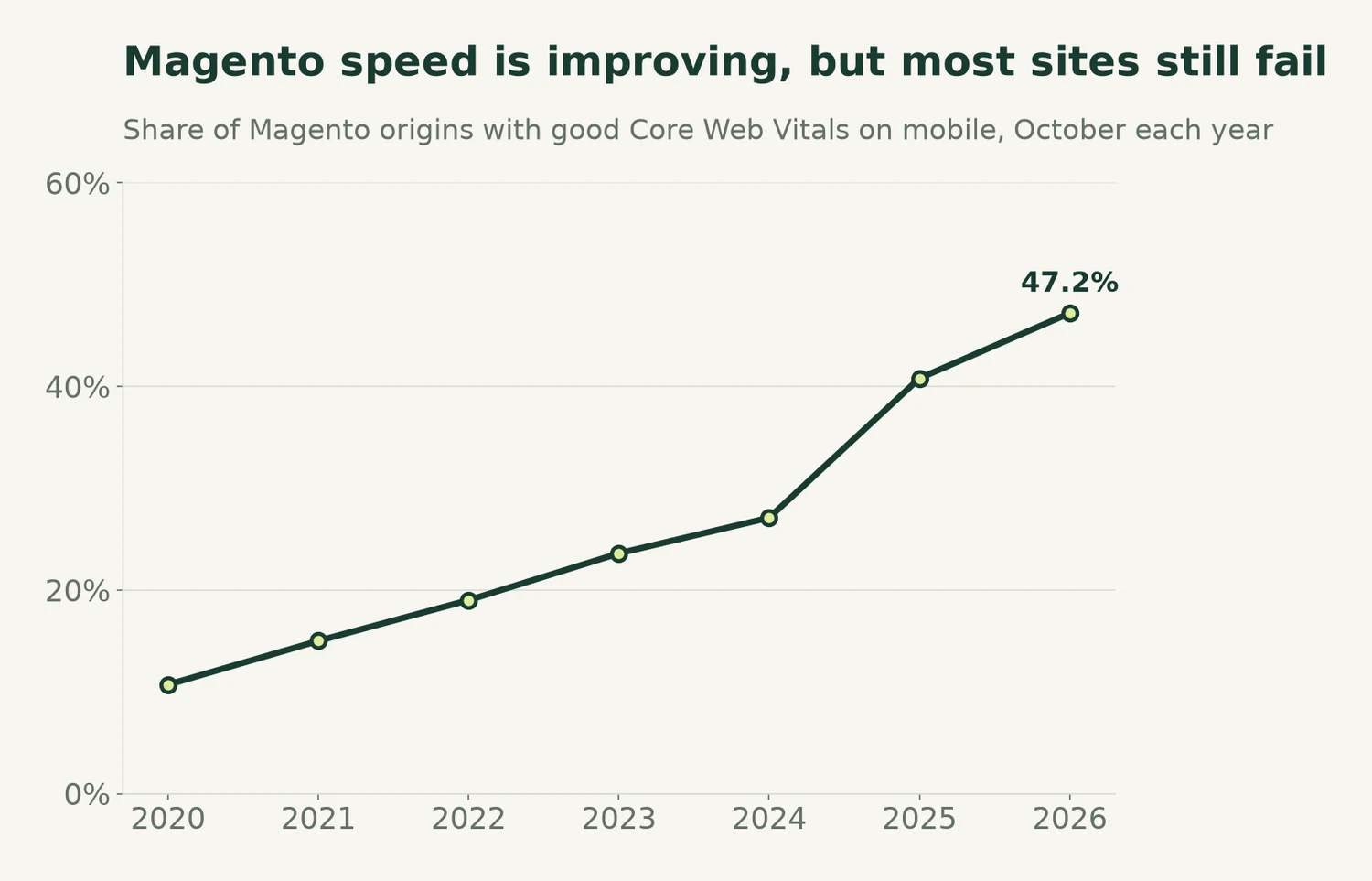
An upgrade is also a good moment to look at speed. Real-user data from Google Chrome, collected by the HTTP Archive, shows that Magento sites have improved a lot in recent years. In October 2026, 47.2% of Magento origins passed all three Core Web Vitals on mobile, up from 10.7% in October 2020. That is still behind many hosted platforms.
A large part of that gap is the frontend. The default Luma theme ships a lot of JavaScript. Hyvä, a lightweight Magento frontend, became free and open source in November 2025, and its theme module reached version 1.5.4 in November 2026 according to its changelog. If you are planning a 2.4.9 upgrade and a redesign in the same year, consider doing them in the right order, as described below.

A safe, step-by-step upgrade plan
A typical upgrade path. Each stage has a clear owner and a written sign-off.
- Take stock of what you runList your exact Magento version, PHP version, every extension (with its version and supplier) and any custom modules. Adobe’s Upgrade Compatibility Tool can flag code that will break on the target version.
- Check every extensionAsk each supplier for a 2.4.9-compatible release. Remove extensions you no longer use. Unmaintained modules are the main reason upgrades overrun.
- Agree the hosting stackConfirm your host can run PHP 8.5, MariaDB 11.8 or 12.3 (or MySQL 8.4), OpenSearch 3 and Valkey 9. Upgrade these on staging first.
- Upgrade a copy, not the live storeClone production data into staging, run the Composer upgrade and fix deprecations. Keep a written log of every change.
- Test what makes moneySearch, product pages, basket, checkout, every payment method, emails, admin order processing, ERP or Linnworks sync, and Google and Microsoft Merchant Center feeds.
- Check speed and trackingCompare Core Web Vitals and Lighthouse scores before and after. Confirm GA4 purchase events and ad conversions still fire once per order.
- Pick a quiet windowAvoid Black Friday, Christmas and big promotions. Put a code freeze in place and have a tested rollback plan.
- Launch and monitorWatch error logs, order volumes and payment success rates closely for the first week. Then put the next security patch date in the diary.
Upgrade first, or Hyvä first?
Upgrade first, then Hyvä
- Best when your current version is out of support
- Removes the security risk quickly
- Hyvä build then starts on a stable, current base
- Two smaller projects, easier to test
Do both together
- Can work when the theme is being rebuilt anyway
- One round of regression testing
- Higher risk: more changes at once
- Needs a longer staging period and a clear rollback plan
For most UK stores on 2.4.6 or earlier, upgrading first is the safer route. Security comes first, and a Hyvä project is easier to estimate on a current, supported version.
How to budget for an upgrade
There is no honest single price for a Magento upgrade, because the work depends on how many extensions and customisations you have. The cost drivers are predictable, though:
- Distance travelled. Moving from 2.4.8 to 2.4.9 is far smaller than moving from 2.4.4.
- Extension count and quality. Each third-party module needs checking, updating or replacing.
- Custom code. Bespoke modules may need rewriting for PHP 8.5 and newer libraries.
- Hosting changes. New PHP, database, search and cache versions may mean a server move.
- Testing depth. Integrations with ERP, warehouse, marketplaces and feeds add test time but save expensive surprises.
Ask for a fixed-price audit first. A good audit gives you a written extension list, a risk rating and a firm quote for the upgrade itself.
Frequently asked questions
Is Magento 2.4.9 stable enough for a live store?
Yes. 2.4.9 has been on general release since 12 May 2026. As with any release, test on staging with your own extensions and data before going live.
What happens if I stay on Magento 2.4.6?
Regular support for 2.4.6 ended on 11 August 2026. Magento Open Source stores on 2.4.6 no longer receive security patches. Adobe Commerce customers have extended support until 31 August 2027.
Can I skip versions, for example from 2.4.5 straight to 2.4.9?
Yes, Composer upgrades can jump several minor versions. The work is larger because every extension and customisation must be compatible with PHP 8.5 and the 2.4.9 libraries, so plan extra testing time.
Does Hyvä work with Magento 2.4.9?
Hyvä maintains compatibility with current Magento releases and publishes release notes in its changelog. Check that your Hyvä version and any Hyvä compatibility modules support 2.4.9 before you upgrade.
How often should I apply security patches?
Adobe publishes patches for supported lines on a regular schedule. Aim to apply critical security fixes within days, and plan routine patches into your calendar so they never clash with peak trading.
How long does a Magento upgrade take?
A small store with few extensions can often be upgraded and tested in a few weeks. Stores with many integrations or custom modules take longer. An audit gives you a realistic timeline.
Sources
Figures and product details were checked against these sources in November 2026. Platforms change quickly, so check the latest documentation before making technical or budget decisions.
- Adobe Experience League, Adobe Commerce released versions and support dates
- Adobe Experience League, Adobe Commerce lifecycle policy
- Adobe Experience League, Magento Open Source 2.4.9 release notes
- Adobe Experience League, Adobe Commerce system requirements
- Adobe security bulletin APSB25-88 (SessionReaper fix)
- Sansec, SessionReaper (CVE-2025-54236) research and attack timeline
- Adobe Experience League, Upgrade Compatibility Tool overview
- HTTP Archive, Core Web Vitals Technology Report
- HTTP Archive API, Magento Core Web Vitals data (monthly)
- Hyvä, Hyvä Theme is now open source and free (November 2025)
- Hyvä Docs, theme module changelog
- PHP.net, supported versions
Want a second opinion on your own store? Email hello@palmultimedia.com or send a message with your website address and the problem you are trying to solve.
