
- Magento 1 has had no official security patches since June 2020. Migrate if you are still on it.
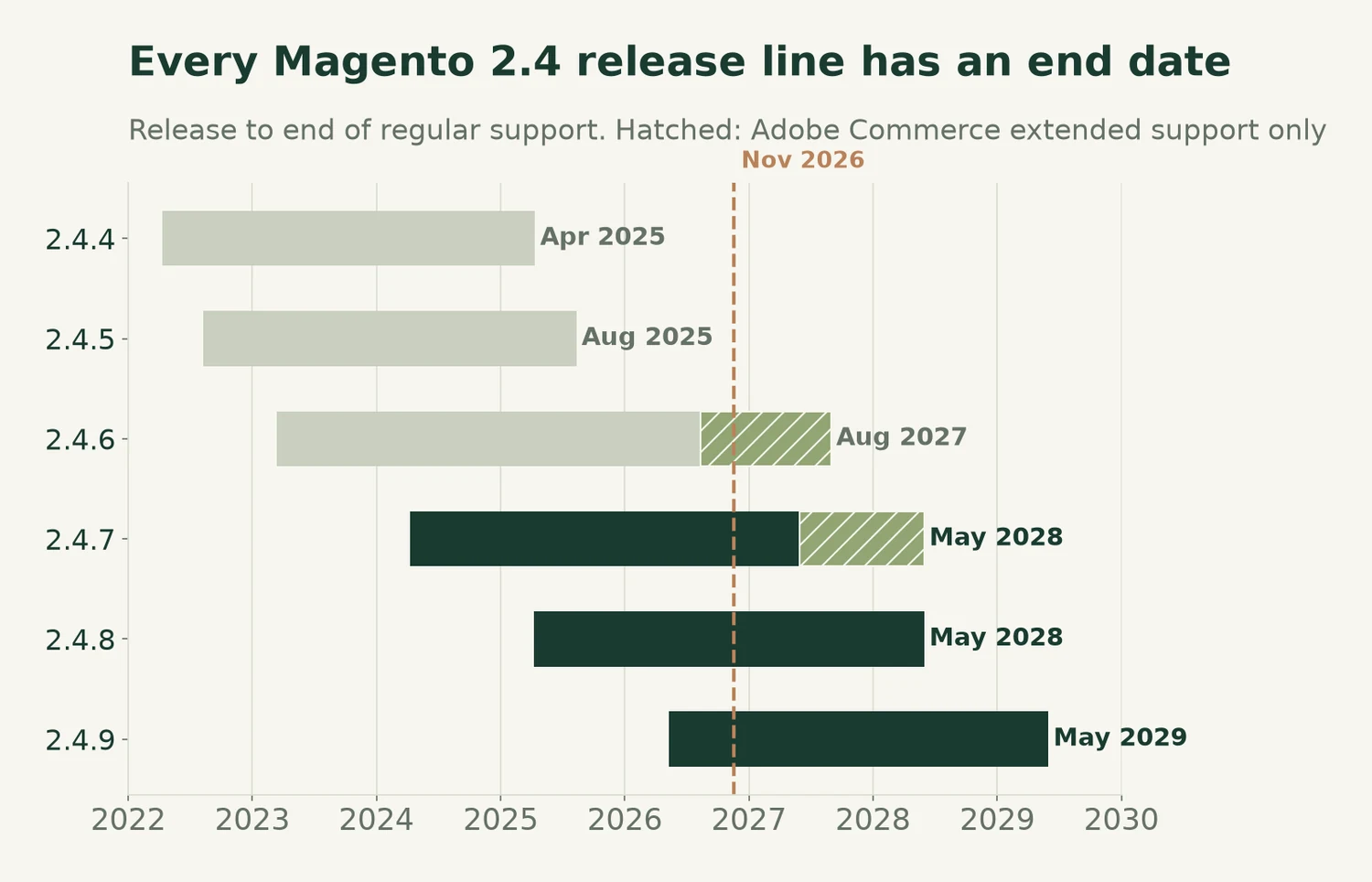
- Magento 2 releases now age out on a schedule: 2.4.9 is supported until 31 May 2029.
- UK Magento sites in Chrome data fell from 7,299 in 2020 to 3,182 in 2026, while Shopify sites rose to 39,489.
- Choose the route first: upgrade, Magento 1 to 2, Hyvä frontend or replatform.
- Protect SEO with one-to-one 301 redirects, unchanged on-page data and 28 days of close monitoring.
Why migration is back on the agenda
“Magento migration” used to mean one thing: moving from Magento 1 to Magento 2. Adobe stopped supporting Magento 1 on 30 June 2020, and its final security patches shipped that month. Today the word covers three different projects, and choosing the right one is the most important decision you will make.
- Magento 1 to Magento 2. Still happening, and still urgent for the stores that remain on Magento 1.
- An old Magento 2 release to a supported one. Releases now age out on a fixed schedule, so falling behind is easy.
- Replatforming onto Magento from another platform, or away from Magento to a hosted platform such as Shopify.
 Open Source
 Commerce
 Hyvä


Logos are trademarks of their respective owners and are shown for identification only. No partnership or endorsement is implied.
What UK merchants are doing
Chrome’s real-user dataset gives a rough view of which platforms UK stores run on. Since 2020 the number of measurable UK Magento sites has fallen by more than half, while Shopify sites have more than doubled.
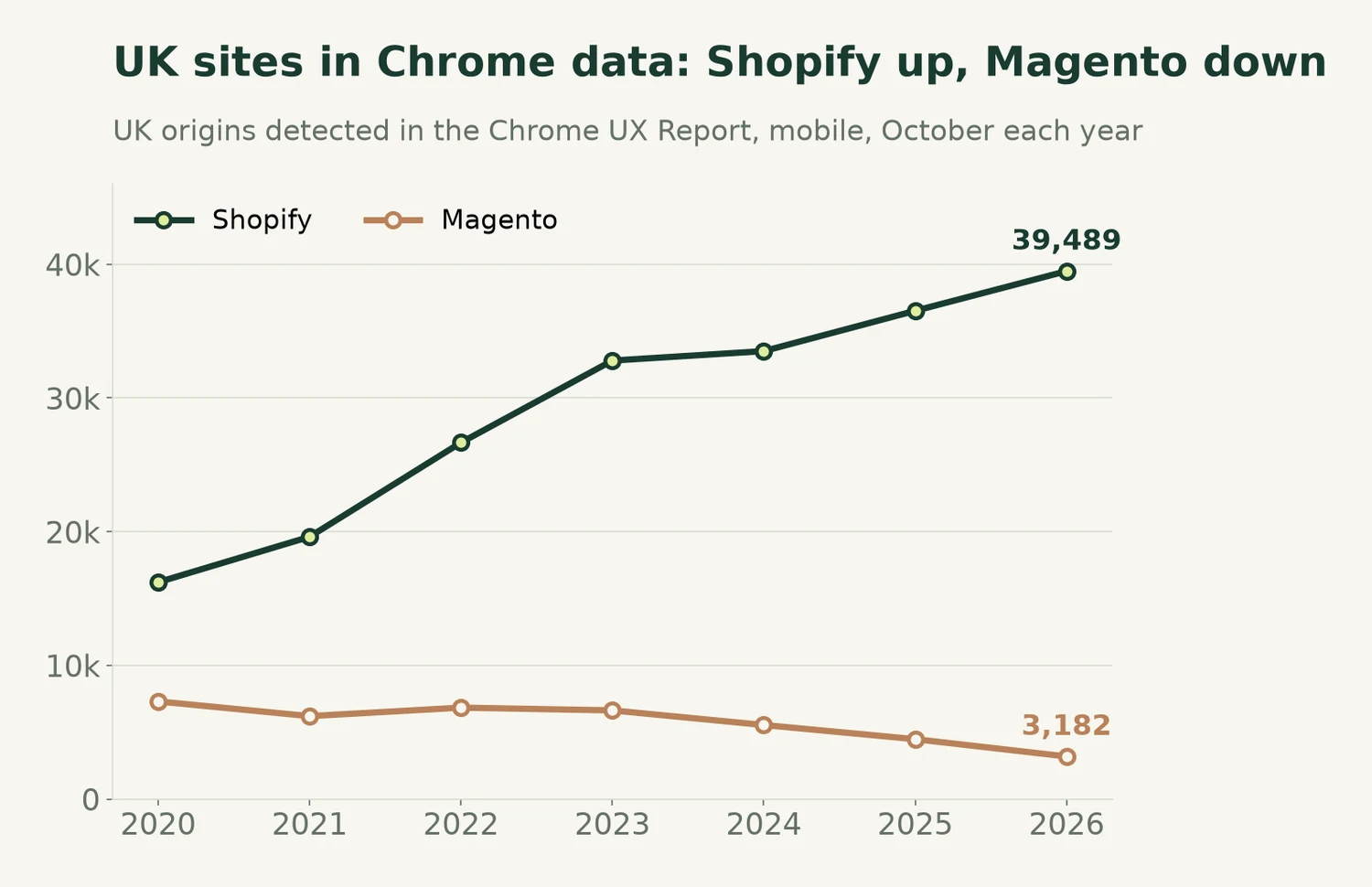
That does not mean Magento is the wrong choice. The stores that remain are often larger, with complex catalogues, B2B pricing or deep integrations, and the platform has improved: in the same data, 56.6% of UK Magento sites passed mobile Core Web Vitals in October 2026, up from 15.0% in 2020. It does mean you should make the platform decision deliberately rather than by default.
Which migration do you actually need?
| Situation | Usually the right move | Main risk |
|---|---|---|
| Still on Magento 1 | Migrate now: to Magento 2 or to another platform | Unpatched software handling customer and payment data |
| Magento 2.4.6 or older | Upgrade to 2.4.8 or 2.4.9 | Running out of support while extensions fall behind |
| Supported Magento 2, slow storefront | Keep the platform, consider a Hyvä frontend | Treating a frontend problem as a platform problem |
| Simple catalogue, small team, high running costs | Evaluate a hosted platform such as Shopify | Losing custom features you rely on |
| Outgrowing a hosted platform | Evaluate Magento or Adobe Commerce | Underestimating hosting and maintenance effort |
Security first. In October 2025 the SessionReaper flaw in Magento and Adobe Commerce was exploited at scale. Sansec reported that only 38% of stores had patched a day before mass attacks began. If you are on an old release, patch now, before any migration project starts. Source: Sansec.
Moving from Magento 1 to Magento 2
Magento 2 is a rebuild, not an upgrade. Themes and extensions do not carry over; data does. Adobe provides the Data Migration Tool, a command-line tool that moves products, customers, orders, configuration and promotions. It runs in three modes, always in this order:
How Adobe’s Data Migration Tool moves a store. Delta mode keeps the new site in step while the old one keeps trading.
Install the tool at the same version as your Magento 2 installation. Expect to map custom attributes and extension tables by hand, and run several rehearsals on staging before launch.

Protecting search traffic
Most migration horror stories are really SEO stories: URLs changed, redirects missed, and rankings took months to recover. Google’s site move guidance is clear about the essentials.
- Keep URLs the same where you can. Where you cannot, map every old URL to its closest new equivalent.
- Use permanent server-side 301 redirects, one hop each, never chains.
- Carry over titles, meta descriptions, canonical tags, structured data and image alt text.
- Submit new XML sitemaps and keep the old ones available for a short time so Google can see the redirects.
- Crawl the old and new sites and compare them before launch.
- On Shopify, URL patterns are fixed (for example /products/ and /collections/), so plan URL redirects early.
A practical migration plan
- DiscoveryList every extension, integration, custom feature and URL pattern. Pull 12 months of analytics and Search Console data.
- Decide the routeUpgrade, Magento 1 to 2, or replatform. Write down why, with the costs of each.
- Design and buildBuild on a supported release, such as Magento 2.4.8 or 2.4.9, or your new platform. Consider Hyvä for a Magento frontend.
- Data rehearsalsMigrate data to staging at least twice. Check order totals, customer logins and product counts.
- SEO and trackingPrepare the redirect map, structured data, analytics events and ad conversion tracking.
- Launch windowPick a quiet trading period, never peak season. Freeze changes on the old site.
- Monitor for 28 daysWatch Search Console, 404s, conversion rate, payments and feed errors daily.
Six mistakes that make migrations go wrong

1. Copying every old feature
Old stores collect features nobody uses. Review each one against analytics before rebuilding it. A migration is the cheapest moment to simplify.
2. Leaving the redirect map until the end
Build it during discovery from your crawl, Search Console and analytics data, then test it on staging with real URLs.
3. Forgetting integrations
ERP, order management, marketplaces, product feeds, reviews and email platforms all connect to your store. List each one, who owns it and how it will be tested.
4. Under-sizing hosting
Magento 2.4.9 needs a modern stack, including PHP 8.5, OpenSearch 3 and Valkey 9 according to Adobe’s system requirements. Plan the hosting with the build, not after it.
5. Launching in peak season
Avoid the weeks before Black Friday and Christmas. Leave time for a calm launch and a month of fixes.
6. Losing tracking
Broken conversion tracking hurts twice: you lose reporting, and smart bidding in Google and Microsoft Ads loses the signals it relies on. Test purchases end to end before switching DNS.
Launch-day checklist
- Final delta migration completed and order numbers continue correctly.
- Redirects tested on a sample of top URLs, including images and PDFs.
- Payments, tax, shipping and emails tested with real orders.
- Google Merchant Center feed and ad conversion tracking working.
- robots.txt allows crawling and noindex tags removed from the live site.
- Backups of the old site kept, and a rollback plan agreed.
Frequently asked questions
Is Magento 1 still safe to run?
No. Adobe ended support on 30 June 2020 and no official security patches have been released since. Stores still on Magento 1 should migrate as a priority.
How long does a Magento migration take?
It depends on catalogue size, integrations and custom features. A version upgrade is far smaller than a Magento 1 to 2 rebuild or a replatform. A short discovery phase gives a realistic plan.
Will I lose my Google rankings?
Not if URLs are preserved or redirected one-to-one with 301s and on-page SEO is carried over. Temporary fluctuation is normal; lasting loss usually comes from missed redirects.
Should I move from Magento to Shopify?
For simpler catalogues and small teams it can lower running costs. Stores with complex pricing, B2B or deep integrations often stay on Magento. Compare total cost and feature fit, not just licence fees.
Which Magento version should I migrate to?
Choose a release with a long support window. In November 2026 that means Magento 2.4.9, supported until 31 May 2029, or 2.4.8, supported until 31 May 2028.
Sources
Figures and product details were checked against these sources in November 2026. Platforms change quickly, so check the latest documentation before making technical or budget decisions.
- Adobe, Security bulletin APSB20-41 (final Magento 1 patches)
- Cyber Security Agency of Singapore, Alert on Magento 1 end-of-life
- Adobe Experience League, Released versions
- Adobe Experience League, Lifecycle policy
- Adobe Experience League, How data migration works
- GitHub, magento/data-migration-tool
- Google Search Central, Site moves with URL changes
- Google Search Central, Redirects and Google Search
- Shopify Help Center, URL redirects
- Adobe Experience League, System requirements
- Sansec, SessionReaper
- HTTP Archive, Technology Report
- Chrome for Developers, CrUX methodology
- Hyvä, Hyvä is free and open source
Want a second opinion on your own store? Email hello@palmultimedia.com or send a message with your website address and the problem you are trying to solve.
